Today I Learned (TIL)
Bits of knowledge I come across that I find worth sharing.
2026-08-25:
I learned about Cara via R’s blog. Cara is an anti-AI and anti–AI scrapping social media platform for artists. They’ve been battling scrappers and decided to take legal action. They are fundraising, and I immediately donated, because fuck generative AI.
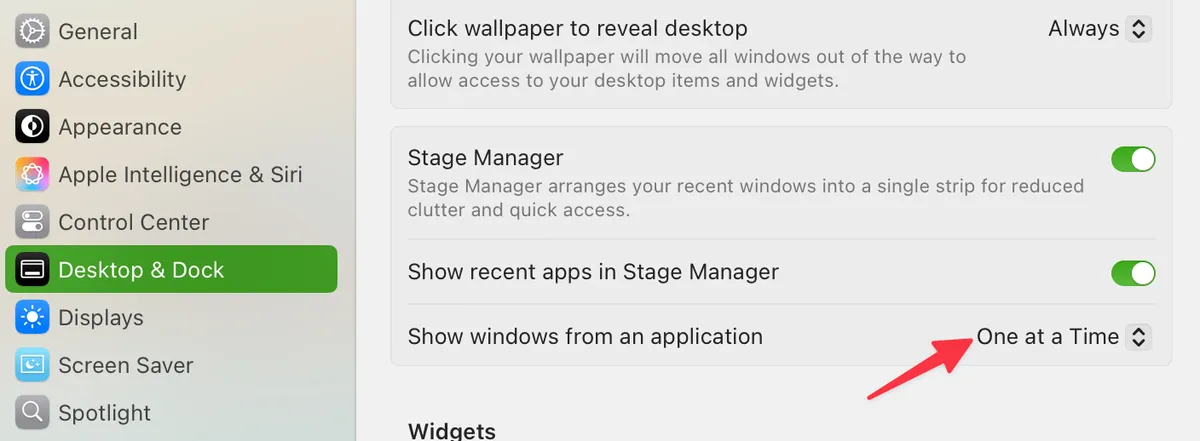
Stage Manager is always activated on my Mac (love the feature), but one thing I struggled with was that I couldn’t put 2 separate windows from the same app in 2 different stages. Turns out, I just needed to set
Show windows from an applicationtoOne at a Time:
2026-07-09: The Government of Canada has a blog on languages in a Canadian context.
2026-06-19: Markdown has two lists “modes” that give you a tight spacing option and a loose one.
To use the tight spacing option, don’t put an empty line between each item:
- this
- is
- a list
Bear Blog will render it as:
- this

- is

- a list
To use the loose spacing option, put an empty line between each item:
- this
- is
- a list
Bear blog will render it as:
this
is
a list
To control the spacing for the tight list, use this code in the CSS:
main li{ margin-bottom:0.25em; }
To control the spacing for the loose list, use this code in the CSS:
main li:has(> p){ margin-bottom:0.9em; }
2026-03-18: I discovered this by accident—in Final Cut Pro, you can get dual viewers by pressing CTR + OPT + 3. I’ve been using FCP for 6 years now and somehow I never knew you could do that!
2026-02-18: In some high-end electric coffee grinders, they have something called the auger which helps prevent the coffee beans from “crowding” the burrs (aka the components that do the actual grinding), thereby increasing the particle size consistency.

Auger on a coffee grinder component. Source
2026-02-10: The degree character (°), the masculine ordinal character (º) and the ring diacritic character (˚) are three different characters. Here are them at 6em font size:
So:
- 23˚C ❌
- 23ºC ❌
- 23°C ✅
On Mac:
- The degree character: OPT + SHIFT + 8
- The masculine ordinal character: OPT + 0
- The diacritic character: OPT + K
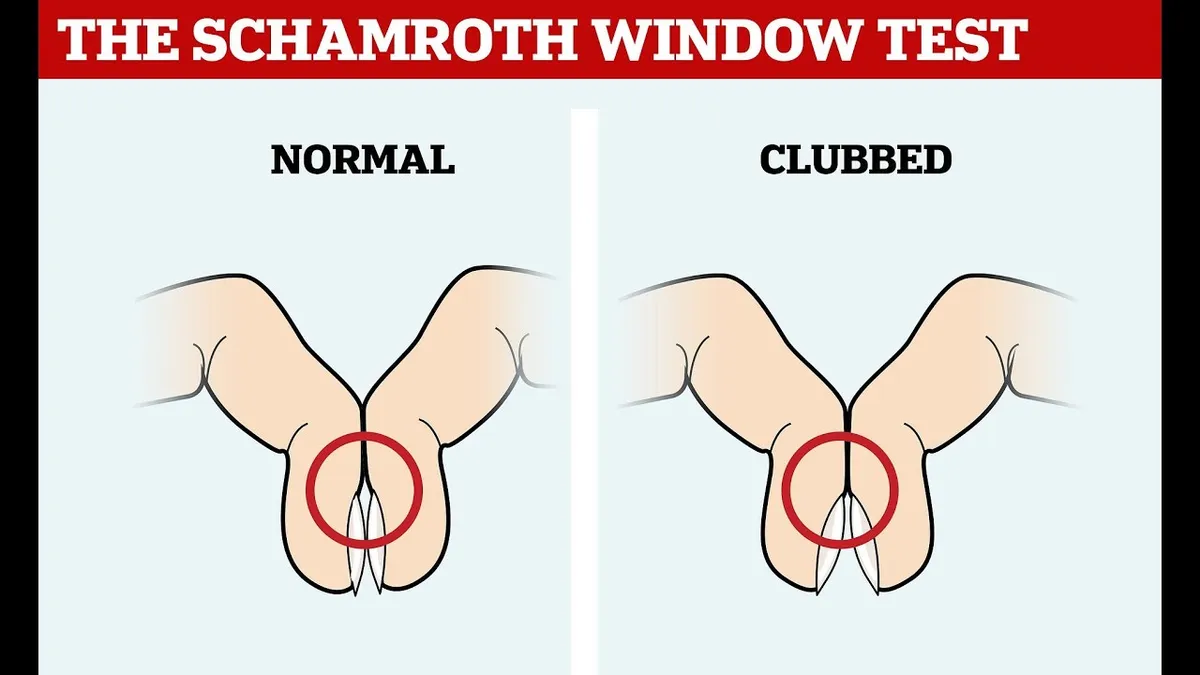
2026-02-08: Nail clubbing—even though it’s a deformation in the nails, it’s a symptom associated with heart and lung diseases. There’s a simple test called Schamroth’s window test that allows you to easily check if you have nail clubbing:
2026-01-29: You can insert a nonbreaking space via CTRL + SHIFT + SPACE on Windows or OPT + SPACE on Mac. It will keep something like “5ʹ 7ʺ” from getting awkwardly separated in a line break. (Source)
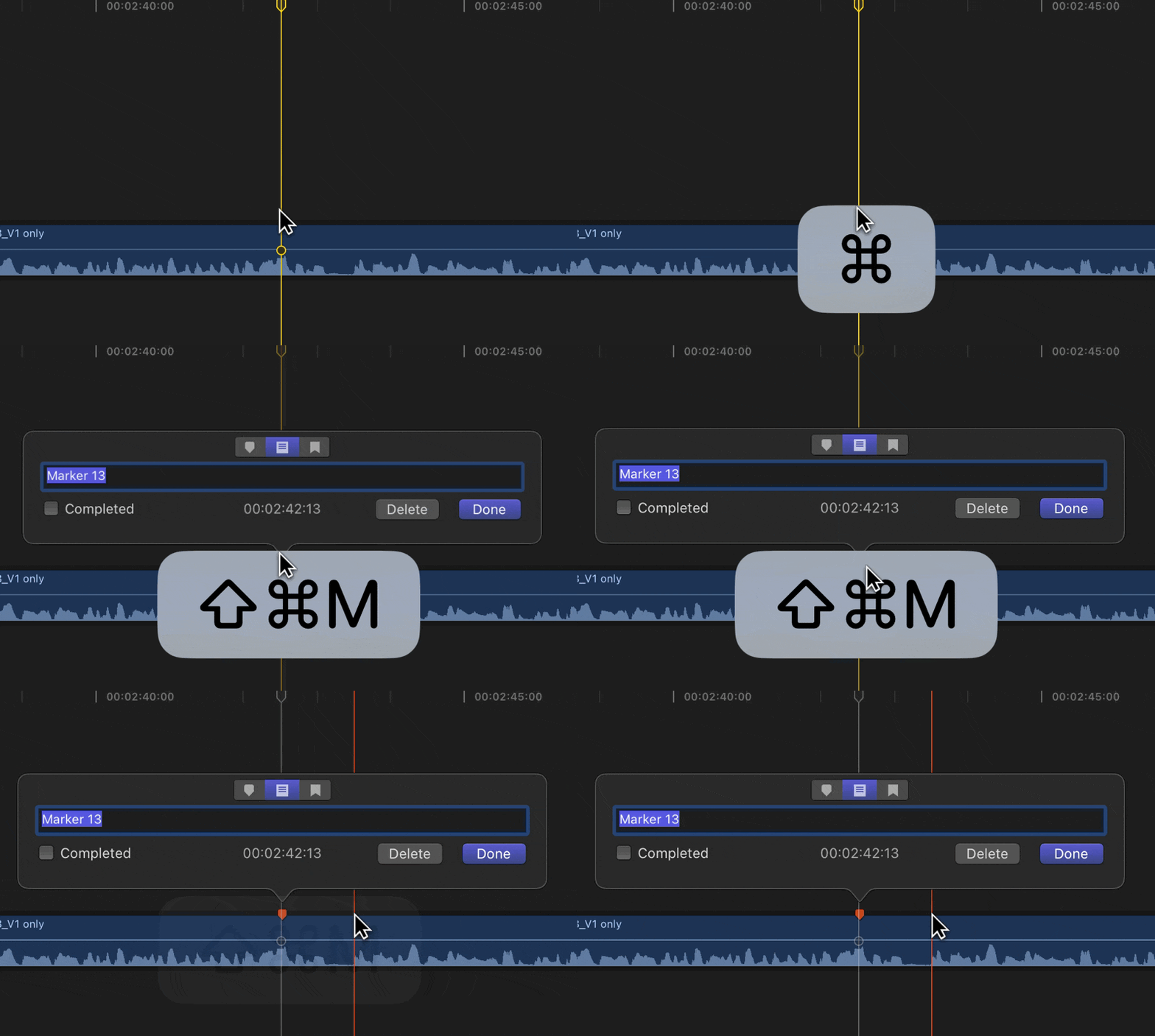
2026-01-23: In Final Cut Pro, there’s a “Add ToDo Marker” command that you can assign a shortcut to, so you don’t have to manually change the Marker type. However, when this command is executed, it only inserts a ToDo marker without prompting you to specify what the to-do is, which I find ridiculous. My workaround is to use BetterTouchTool to create a macro where, upon pressing a shortcut, it will execute the “Add ToDo Marker” command and then the “Modify Marker” command, so this shortcut will add a ToDo marker and prompt me to enter details:
2026-01-22: In Premiere Pro, if you find the 2x shuttle speed too fast when pressing L, you can press SHIFT + L to increase playback speed by 0.5x increments. (Source)